Simple Logging Facade for Java (SLF4J) is a Java abstraction library used to allow the selection of a logging framework at deployment time, rather than at compile time. SLF4J allows the developer to use the logging framework of the deployment environment even if the developer’s code is written for a different logging framework.
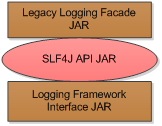
SLF4J uses what I call sandwiches. SLF4J forms the “meat” of the sandwich. The top slice presents a legacy logging framework API to your code, the SLF4J API performs the translation, and the bottom slice interfaces with the real logging framework. A visual version of a sandwich is below:
 For example: if Java code is written to use Log4J, then SLF4J can present a Log4J API interface to the code so that it does not need to change. Visually, this sandwich could look like this:
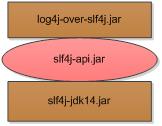 This “sandwich” accepts Log4J log messages at the top but writes Java Logging messages to the logs at the bottom. In this situation, Java Logging could be part of an application server or a legacy system. You can see where this can come in very handy (e.g. transferring applications from WebLogic to JBoss, Resin to Jetty, etc.).
SLF4J is essentially an API facade for multiple Java logging frameworks. If you write your code to use SLF4J logging, then theoretically you will not need to worry about the logging framework ever again, because the libraries will take care of the translation!
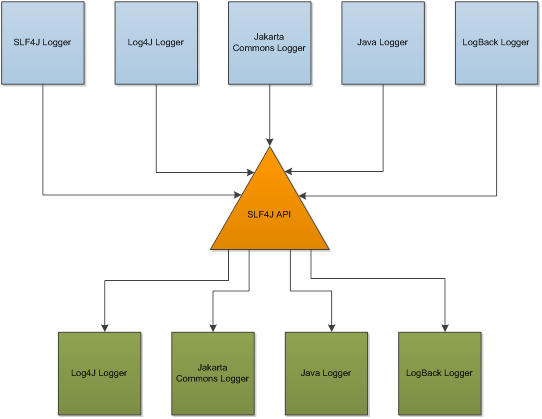
Another way to understand how SLF4J works is to imagine a telephone operator of old: when the operator (SLF4J) receives a call (a log message in one logging framework), it routes the call to the appropriate recipient (a log message in another logging framework). The log message arrives in one “language” and must be re-sent in another “language.” This translation is why SLF4J allows you to log with one framework but actually use another:
 Say you have legacy code that relies on Log4J and you want to deploy it to a server that uses Jakarta Commons Logger framework. You rebuild your legacy code and replace log4j.jar with log4j-over-slf4j.jar so that log messages meant for Log4J go instead to SLF4J:
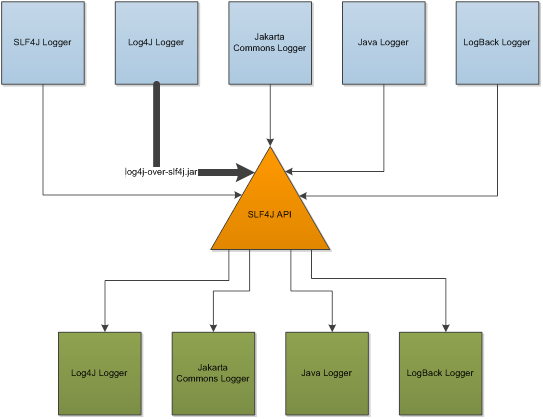 The SLF4J “operator” receives the Log4J message and initiates a log operation using the slf4j-api.jar library. This library is framework-indifferent; it requires a library to translate that log message into a specific logging framework message format. By virtue of the presence of the slf4j-jcl.jar library in the build, it sends the log message to the Jakarta Commons Logger:
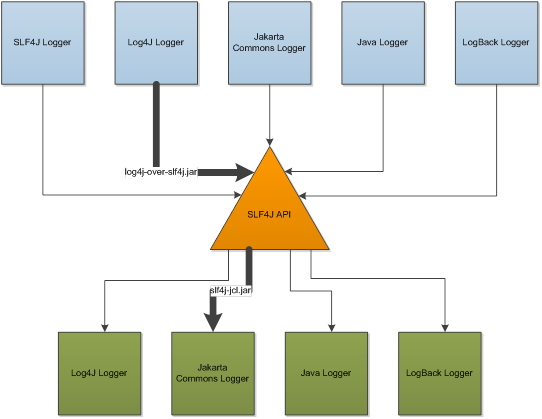 The legacy code is none the wiser, and it is using the system’s logger without mass manipulation of the code. Woo-hoo!
I now use SLF4J in all my Java code, and it allows me to not worry about which logging framework I have to use. All I have to do is make sure I have the correct libraries included at deployment time, and SLF4J takes care of the rest. Some application servers (such as Red Hat’s JBoss) include SLF4J as part of their distribution. This makes logging even easier. Applications need only include the logging framework facade JAR (if it is not already logging directly to SLF4J) and the SLF4J JAR, and the application server does the rest.
Read more about SLF4J.
2 August 2014 at 1:09 PM
Thank you for this great tutorial.
I was confused over the meaning of all the different Java logging libraries, and this is the first explanation that fully made sense to me.